Case Study: A Multi-Tenant Issue Tracker over MCP
Ten object types, authored from an AI editor over MCP, serving every customer from one deployment — and the permission error that only appeared when a real user tried to file a bug.
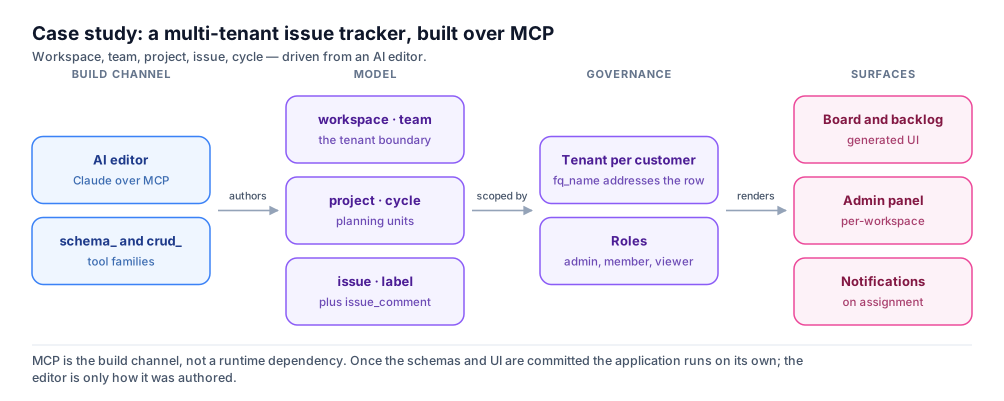
The Brief
ℹ️ The exemplar, and its caveat
bundle_m73-flowline in ~/supero-test/e2e-tests/apps/bundle_m73-flowline, namespace flowline. Its schemas.py says outright that it was reconstructed from the live application’s shape, with fields observed through CRUD — an accurate record of the model, not the generator’s original output.The Model
ALL_SCHEMAS = [
  {"name": "issue_status", "schema_type": "enum",
   "values": ["backlog", "todo", "in_progress", "done"]},
  {"name": "Workspace", "namespace": "flowline", "attributes": [
      {"name": "name", "type": "string"},
      {"name": "slug", "type": "string"}]},
  {"name": "Issue", "namespace": "flowline", "attributes": [
      {"name": "title", "type": "string"},
      {"name": "status", "type": "issue_status"},
      {"name": "priority", "type": "string"},
      {"name": "estimate_points", "type": "integer"}]},
  {"name": "Membership", "namespace": "flowline",
   "extends": "membership:base_membership",
   "attributes": [{"name": "name", "type": "string"}]},
]| Type | Fields | Why it exists |
|---|---|---|
Workspace | name, slug | Top of the customer’s world; the slug is the URL. |
Team | name, key | The prefix in issue identifiers. |
Member | name, role | A person, distinct from the user account behind them. |
Project | name, slug, status | Reuses issue_status, so progress reads the same way. |
Issue | title, status, priority, estimate_points | The record the product exists to serve. |
Label | name | Deliberately thin; labels earn their keep by being cheap. |
Cycle | name, start_date, end_date | The time box. |
IssueComment | body | The conversation on an issue. |
issue_status | enum: backlog, todo, in_progress, done | One vocabulary, declared once, reused twice. |
Membership | name + membership:base_membership | The only type extending a service. |
membership:base_membership brings status, role, joined_at, suspended_at, expires_at, suspension_reason and a state machine that can suspend, expel and transfer — the difference between an issue tracker and one you can sell.Building It over MCP
schema_* to author the model, crud_* to put records through it. There is no separate authoring language.- 1
Declare the vocabulary first
schema_saveforissue_status.Issue.statusandProject.statusreference it by name, so it must exist before they can save. - 2
Author the container types
Workspace,Team,Project— slugs and keys here, because they end up in URLs and are painful to change. - 3
Author the working types
Issue,Label,Cycle,IssueComment,Member, all plain objects. A tracker earns nothing from extending a service here. - 4
Extend one service on purpose
Membershipwith"extends": "membership:base_membership"— where the mechanics must be exactly right. - 5
Validate before you trust it
schema_validateandschema_list_project, to confirm what landed rather than assume a successful call meant a correct schema. - 6
Put records through it
crud_create,crud_search,crud_get,crud_update,crud_delete— as the roles that will really use them.
🚨 The trap that silently costs you the service
extends must live inside schema_content. At the wrapper level it is stripped without warning: the call succeeds, the schema appears in schema_list, and you have a plain object type with none of the membership lifecycle. Nothing fails — you discover much later that suspending a member does nothing. Re-read every extends save with schema_get.Tenancy and Access
fq_name. One customer per tenant means one customer’s issues cannot be addressed from another’s, whatever the query says.fq_name: ["m73-corp", "m73-flowline", "acme-tenant", "ISS-142"]
GET /api/v1/crud/{domain}/{type}?limit=50&cursor=...
Authorization: Bearer <jwt> // OR X-API-Key: ak_...⚠️ There is no tenant header
X-Domain, no X-Tenant, no X-Project. Tenancy comes from the authenticated principal and the path, never a header a client could set. The two auth headers are mutually exclusive: a bearer JWT or an API key. Pagination is cursor-based; page and page_size are silently ignored, which on a long issue list means the same first page forever.domain_admin, domain_user, project_admin, project_user, developer, tenant_admin, tenant_user and viewer; platform_admin and platform_user are Supero-operator roles you will not hand out. There is no super_admin. For a tracker, tenant_admin and tenant_user are the two that matter daily, and the boundary between them is most of the security design. See Building Multi-Tenant Apps.Notifying on Assignment
@<verb>:<namespace>:<schema>, with an input_map carrying record fields into the workflow. It is itself a record of type wf:workflow_definition; each run writes a workflow_instance, each step a workflow_step_log.// The verified shape, from app_ctr/event_bindings.json
[{"event": "@create:trialhub:adverse_event",
"workflow_id": "adverse_event_alert",
"input_map": {"event_uuid": "uuid", "severity": "severity"}}]crud_operation creating a notification record — a type extending notification:base_notification — then a service_call handing it to the email service. Step types are service_call, crud_operation, condition, parallel and transform.ℹ️ Stated plainly
bundle_m73-flowline ships no event_bindings.json and no notification type. The binding above is quoted from bundles that do — app_ctr and app_m71-gym. This is the shape you would add, not something already in the tracker. Design the assignment event as a record creation you can bind to; @create is the verb these working examples use.What It Took
What came free
- •Tenancy. Ten schemas, zero lines of isolation logic, one deployment serving every customer.
- •Seat lifecycle from one line —
"extends": "membership:base_membership"on a type contributing onenamefield. - •The platform roles, and a CRUD surface with cursor pagination and filtering.
What had to be decided
- •That
issue_statusis one enum shared byIssueandProject, rather than two that drift apart. - •That
Memberis a tracker record distinct from the user account behind it — the alternative looks simpler and hurts the moment someone leaves. - •That
Labelstays one field, and aCycletwo dates and a name, because rollover is a policy argument nobody wanted yet.
What would bite you
tenant_user. Creating a membership returned HTTP 201. Creating an issue returned HTTP 403:HTTP 403 as [email protected]
{"error": "Forbidden: Your role does not have create access to flowline:issue"}🚨 The model was right and the app was unusable
schemas.py never reveals this. It surfaced only by putting a record through the API as the role that would really use it. Do that on day one, for the operations that define your product.Where to Go Next
The other case study
A Subscription Business, End to End
The opposite entry point — App Studio, not MCP. Read it
On this page