Documentation/Getting Started/Core Concepts
Core Concepts
The vocabulary and data model every Supero app is built on: the Domain/Project/Tenant hierarchy, namespaces, schemas, records, and how roles map to the generated UI.
Overview
This page defines the building blocks you will see throughout the Supero docs and SDKs: the account hierarchy, the schema model that drives every generated API and admin screen, how records are keyed and scoped, and how a user's role determines which generated UI surface they land on. Read this before the Quick Start if you want the "why" behind the commands; read it after if you just ran your first request and want the mental model.
The Two Halves: Builder and Runtime
Before any of the vocabulary below, there is one distinction worth fixing in your head, because almost every confusing question about Supero resolves once you know which half you are asking about.
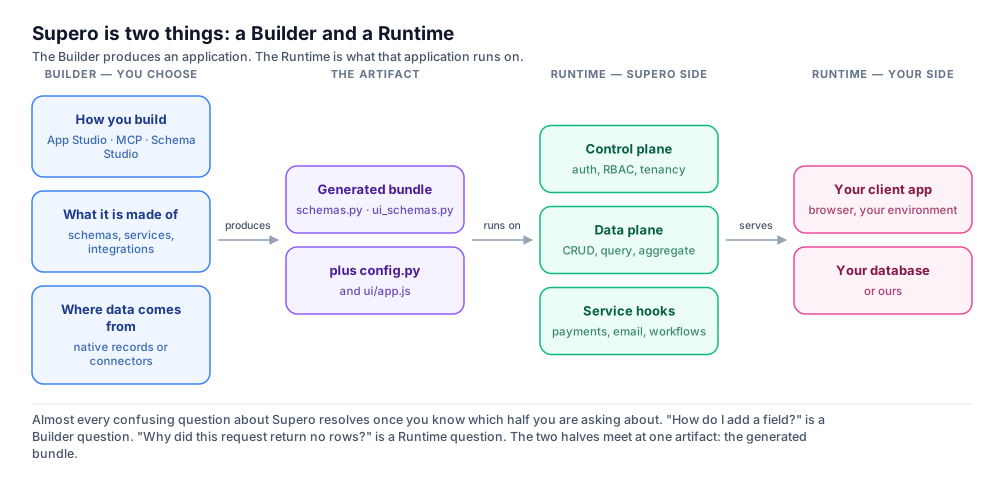
The Builder is where you make choices: how you build (App Studio, your AI editor over MCP, or Schema Studio — see Ways to Build), what the application is made of (which object types, which platform services, which integrations), and where its data comes from (records the platform stores, or tables a connector registers from a system you already run). What comes out is a generated bundle — your schemas, your UI schemas, your configuration, and the application script.
The Runtime is what that bundle then runs on, and it spans two environments rather than one. The Supero side provides the control plane (authentication, roles, tenancy), the data plane (CRUD, query and aggregate over your records), and the service hooks that reach payments, email, storage and workflows. Your side is the client application your users actually load, and — if you brought one — your own database.
ℹ️ Why the distinction is worth keeping
"How do I add a field?" is a Builder question, answered by changing a schema and regenerating. "Why did this request come back with no rows?" is a Runtime question, answered by looking at the caller's role, tenant and connector binding. Reaching for the wrong half is the single most common way to spend an hour on a five-minute problem.
The path a request takes at runtime
It is worth knowing the hops, because knowing which one failed is most of debugging.
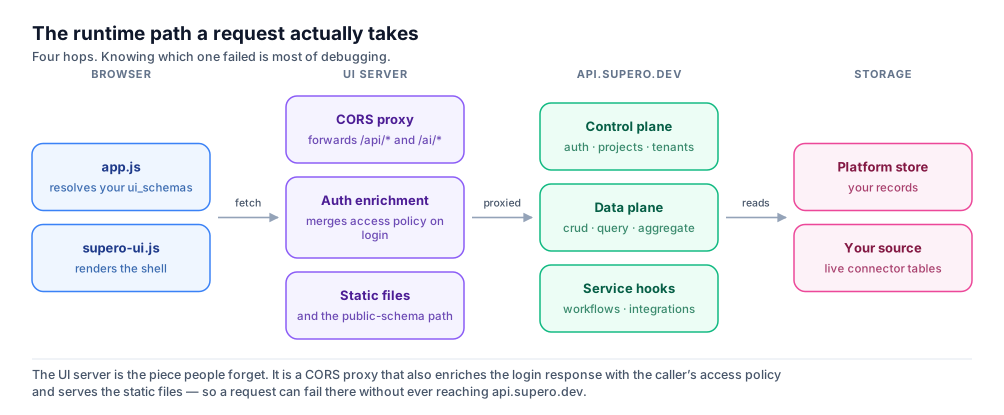
The piece that surprises people is the UI server. A generated application is not a static bundle talking straight to the API: it is served by a small server that proxies /api/* and /ai/* through to api.supero.dev, serves the static files, and enriches the login response with the caller's access policy so the front end knows what to render. A request can therefore fail at that proxy without ever reaching the platform — which is why an error message that names no Supero service is usually a UI-server or configuration problem, not a platform one.
For the full service-by-service breakdown, see Architecture; for what a generated bundle contains file by file, see Anatomy of a Supero App.
The Vocabulary
Everything below is expressed the same way whether you call the REST API directly, use the Python SDK, or look at data through the dashboard — they are three views onto the same objects.
Domain, Project, Tenant
Every object in Supero lives under a fixed ownership hierarchy:
text
Domain
  └─ Project
       └─ Tenant
└─ UserAccount / ApiKey| Level | What it is |
|---|---|
| Domain | The top-level account. Domain names are globally unique and identify your organization. |
| Project | An isolated backend environment inside a domain — its own schemas, data, and generated API surface. Most day-to-day work happens inside one project. |
| Tenant | A data-isolation boundary inside a project. Every project has a default tenant; SaaS apps create additional tenants so customers cannot see each other's data. |
| UserAccount / ApiKey | The credentials that authenticate as a specific tenant. A user account is a person; an API key is a machine credential — both resolve to a domain/project/tenant scope. |
Object creation and lookups walk this hierarchy: a tenant belongs to a project (parent_type "project"), a user_account or api_key belongs to a tenant (parent_type "tenant"), and your own business objects typically hang off the tenant too.
Namespace
Namespace is a separate, orthogonal concept from the Domain/Project/Tenant hierarchy — it is a label used to group and qualify schemas, not another level of ownership. Every schema is uploaded into a namespace (a project has a default schema namespace, commonly "tenant", used automatically when a schema omits one).
- •A schema type is addressed unqualified within its own namespace (e.g. "customer"), or qualified with its namespace when referenced from elsewhere (e.g. "billing:customer").
- •Namespaces let two projects, or two schema packages within a project, define types with the same short name without colliding.
- •The "extends" field on a schema (see below) uses the same "namespace:type" qualified form to point at its base schema.
Authentication and Context
You authenticate with a POST to /api/v1/auth/login. The domain, project, and tenant are fields in the JSON request body — they are not URL query parameters. Project and tenant are optional; omitting them resolves to that user's default project and default tenant. Authentication is the full reference for tokens, API keys, and scoping.
http
POST /api/v1/auth/login
Content-Type: application/json

{
  "domain": "your-domain",
  "email": "[email protected]",
  "password": "your-password",
  "project": "default-project",
  "tenant": "your-tenant"
}
A successful login returns an auth block, the user record, a context block, and a resolved access policy:
json
{
  "auth": {
    "access_token": "...",
    "refresh_token": "...",
    "token_type": "Bearer",
    "expires_in": 28800,
    "session_id": "..."
  },
  "user": { "email": "...", "role": "tenant_admin", "ui_view": "admin", ... },
  "context": { "domain_name": "...", "project_name": "...", "tenant_name": "..." },
  "policy": { ... }
}
Access tokens are valid for 8 hours; refresh tokens for 7 days. Refresh with POST /api/v1/auth/refresh and revoke a session with POST /api/v1/auth/logout.
For subsequent requests, send the access token as Authorization: Bearer <token>, or send an API key as the X-API-Key header. Scope (which domain/project/tenant a request operates on) comes from the token or key itself, and can be narrowed further with project and tenant query parameters on read endpoints — it is never set via a separate required header.
🚨 Bearer vs API key
Never send an API key value in the Authorization: Bearer header. API keys are opaque secrets (they start with ak_) and must be sent as X-API-Key. Bearer is reserved for JWT access tokens issued by login.
Roles and Generated UI Surface
Every user and API key has a role. Roles determine both what a request is allowed to do (via access policies) and which generated UI surface a logged-in user sees. The Roles & Permissions Reference lists every role and what it can do; Access Control (RBAC) covers how enforcement works.
| Role | Typical scope |
|---|---|
| domain_admin / domain_user | Manage or view everything inside a domain, across projects. |
| project_admin / project_user | Manage or view a single project, across its tenants. |
| developer | Project-scoped, build-oriented access. |
| tenant_admin / tenant_user | Manage or use data within a single tenant — the common roles for an app's own customers and staff. |
| viewer | Read-only access within a tenant. |
On login, the platform derives a ui_view field on the user object: "admin" for roles that manage a domain, project, or tenant (plus developer), and "customer" for everyone else. Generated apps read client.userInfo.ui_view (or the equivalent SDK field) at boot to decide whether to render the admin dashboard/data-management shell or the public storefront-style landing experience — so your app does not need to hand-roll role-string checks. Admin vs Customer Views covers the split in detail.
Schemas
A schema defines one object type: its fields, its parent in the hierarchy, and its relationships. Schemas are what the platform uses to generate CRUD endpoints, validation, and admin screens. This section is the short version; the Schema Reference is the complete one.
A schema is uploaded as JSON with a name, a namespace, and a schema_content body:
json
{
  "name": "Order",
  "namespace": "tenant",
  "schema_type": "object",
  "schema_content": {
    "name": "Order",
    "parent_type": "tenant",
    "attributes": [
      { "name": "order_number", "type": "string", "mandatory": true },
      { "name": "total_amount", "type": "float", "mandatory": true },
      { "name": "status", "type": "string", "mandatory": false,
        "values": ["pending", "confirmed", "shipped", "delivered", "cancelled"],
        "default-value": "pending" }
    ],
    "references": [
      { "name": "customer", "cardinality": "one" }
    ]
  }
}
Fields
Each entry in attributes[] describes one field: name, type, mandatory (true/false), and for enum-like fields a values[] list plus an optional default-value. There is no separate JSON-Schema-style properties{} object — attributes[] is the whole field list.
ℹ️ attributes is canonical; fields is accepted
The sample above uses the canonical spelling: attributes for the field list, and mandatory on an individual field. The older spellings still work — fields is accepted as a synonym for attributes, and required as a synonym for mandatory — but the two pairs do not behave the same once you read back. A body sent with fields is stored under attributes, so a schema you upload and then read never returns the key you wrote; expect the response to differ from your request there. required is accepted but never rewritten, so a schema authored with required reads back with required while anything it inherits from a platform base carries mandatory. Write attributes and mandatory in anything you maintain, and see the Schema Reference.
| Type | Notes |
|---|---|
| string | Text. Also used for enums — pair with values[] to constrain to a fixed set. |
| text | Long-form text. |
| integer | Whole numbers. |
| float | Decimal numbers. There is no separate "number" or "decimal" type — use float. |
| boolean | True or false. |
| datetime | ISO 8601 timestamp. |
parent_type and extends
parent_type places a schema in the Domain/Project/Tenant hierarchy (commonly "tenant" for your own business objects). extends builds one schema on top of another using the qualified "namespace:base_name" form — e.g. "catalog:base_product" — so the derived schema inherits the base schema's fields and references and can add or override its own. The base schemas the platform ships are catalogued in Transactional Services.
references — relationships
Relationships between object types are declared with references[], not with an inline field of type "reference". Each entry names the related type and a cardinality ("one" or "many"); the platform manages the underlying link and exposes it through the refs endpoints (get/update references) rather than as a plain data field.
Records and System Fields
Every record the platform stores — whether it is your own business object or a platform entity like a tenant — carries the same system fields:
| Field | Meaning |
|---|---|
| uuid | The record's primary key. Records are always keyed on uuid, never on "id". |
| created_at / updated_at | Timestamps maintained by the platform. |
| fq_name | The fully-qualified name path from the domain down to this record. |
| parent_type | The hierarchy or schema type this record hangs off (e.g. "tenant", "project"). |
| parent_uuid | The uuid of that parent record. |
A create response returns the record's system fields plus whatever fields you sent; look up a specific record with its uuid, not a name or slug.
CRUD and Queries
Every schema you upload gets a matching REST surface under /api/v1/crud/{domain}/{type} — see CRUD Endpoints for the full contract and Querying & Pagination for filters, sorting, and cursors:
| Operation | Request |
|---|---|
| Create | POST /api/v1/crud/{domain}/{type} |
| Get one | GET /api/v1/crud/{domain}/{type}/{uuid} |
| List | GET /api/v1/crud/{domain}/{type} |
| Update | PUT /api/v1/crud/{domain}/{type}/{uuid} |
| Delete | DELETE /api/v1/crud/{domain}/{type}/{uuid} |
| Rich query | POST /api/v1/crud/{domain}/query |
| Bulk list | POST /api/v1/crud/{domain}/list-bulk |
The Python SDK mirrors this one-to-one: org.crud.create(type, name=..., **fields), org.crud.get(type, uuid), org.crud.list(type), org.crud.update(type, uuid, **fields), org.crud.delete(type, uuid). For filtered, ordered reads use the query builder: org.crud.query(type).filter(status="open").order_by("-created_at").limit(10).all().
python
import supero

org = supero.login(
    domain_name="your-domain",
    email="[email protected]",
    password="your-password",
)

order = org.crud.create("order", name="o-1001", order_number="1001", total_amount=42.50)

open_orders = (
    org.crud.query("order")
    .filter(status="pending")
    .order_by("-created_at")
    .limit(10)
    .all()
)
💡 Machine access
For server-to-server calls without an interactive login, use supero.connect(domain_name, api_key="ak_...") to get the same org object without a password.
Next Steps
- •Quick Start — go from zero to your first deployed app.
- •Schema Reference — a deeper look at building schemas, including inheritance and validation.
- •Projects & Tenants — day-to-day tenant management once your app is running.
- •Access Control (RBAC) — how to write and manage access policies for your roles.
- •Ways to Build — the five entry points into the platform, compared.
On this page