S
supero.docs
Developers/Platform Overview/Architecture

Architecture

The mental model you need before integrating: one public API host, how a request is authenticated and scoped, how the schema drives everything downstream, and how tenant isolation is enforced.
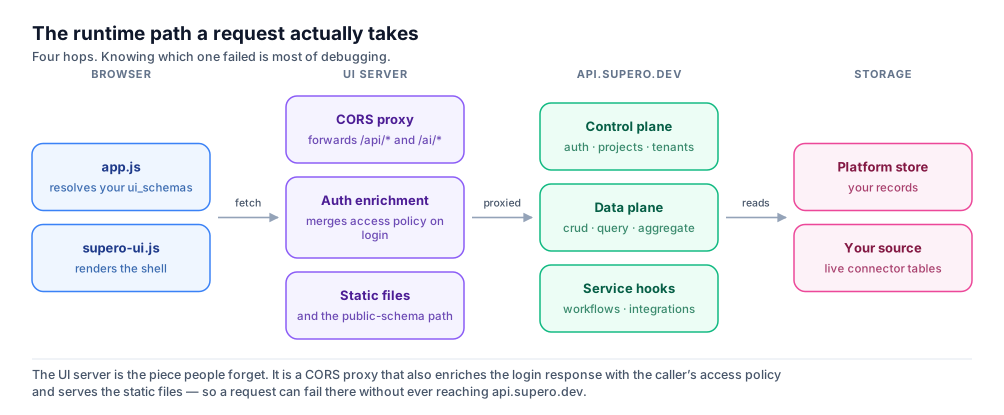
A request travelling from the browser through the application server to the Supero API and on to storage
Four hops. Knowing which one failed is most of debugging.

Overview

Supero is a schema-driven backend platform: you define data models, and the platform derives a REST API, role-based access control, and an admin UI from them. This page is the mental model to have before you integrate — what you call, how a request is authorized, and what guarantees you are relying on.
Every client request — from a browser, from the Python or JavaScript SDK, or from a direct HTTP call — targets a single public host: api.supero.dev. There is no separate gateway to configure and no service mesh for you to reason about. What varies is not where you send a request, but what the caller is allowed to see when it arrives.

ℹ️ The design principle worth internalising

The schema is the single source of truth. Once you define a type’s fields, references, and access policy, the REST endpoints, the SDK methods, and the generated admin screens are all derived from it. You do not write and then separately maintain an API layer that has to be kept in step with the model.
The second principle is that tenant isolation is structural. It comes from where a record sits in the hierarchy, not from a filter your application has to remember to apply. That distinction is the subject of Tenant isolation below, and it is the property most worth checking if you are evaluating Supero for multi-customer software.

What You Talk To

Three hosts matter to a developer, and it is worth knowing which one an error belongs to.
HostWhat it isYou use it for
api.supero.devThe public APIEverything programmatic: auth, CRUD, query, schemas, connectors, services, workflows.
app.supero.devThe dashboardBuilding, managing projects and tenants, issuing API keys, publishing.
*.supero.liveWhere published apps runYour end users. Each published app gets its own subdomain.
A generated application adds one more hop that surprises people: it is not a static bundle calling the API directly. It is served by an application server that proxies API calls through to api.supero.dev, serves the static files, and enriches the login response with the caller’s access policy so the front end knows what to render. A request can therefore fail at that proxy without ever reaching Supero — which is why an error naming no Supero endpoint is usually a configuration problem in your own app, not a platform one.
For what a generated bundle contains, see Anatomy of a Supero App. For the Builder-versus-Runtime split this sits inside, see Core Concepts.

A Request End to End

A typical integration authenticates once, then reads and writes records under a schema type.
bash
# 1. Authenticate
curl -X POST https://api.supero.dev/api/v1/auth/login \
  -H "Content-Type: application/json" \
  -d '{"domain": "acme", "email": "[email protected]", "password": "..."}'

# The access token is nested: response["auth"]["access_token"]

# 2. Call the CRUD API with that token
curl https://api.supero.dev/api/v1/crud/acme/product \
  -H "Authorization: Bearer <access_token>"

# ...or with an API key instead of a JWT
curl https://api.supero.dev/api/v1/crud/acme/product \
  -H "X-API-Key: ak_..."
python
import supero

org = supero.login(domain_name='acme', email='[email protected]', password='...')

products = org.crud.list('product')
new_product = org.crud.create('product', name='Widget', price=9.99)

💡 Two auth mechanisms, and they are not interchangeable

Authorization: Bearer <jwt> is for user sessions — login, refresh, logout. X-API-Key: ak_... is an opaque secret for service-to-service or long-lived integrations. They are mutually exclusive: setting one clears the other. Never send an API key as a Bearer token. There is no X-Domain, X-Tenant or X-Project header — the domain is a path segment and the project and tenant are claims inside the token.

How a Request Is Authorized

Authorization happens in two distinct layers, and knowing which one refused you saves a great deal of time.
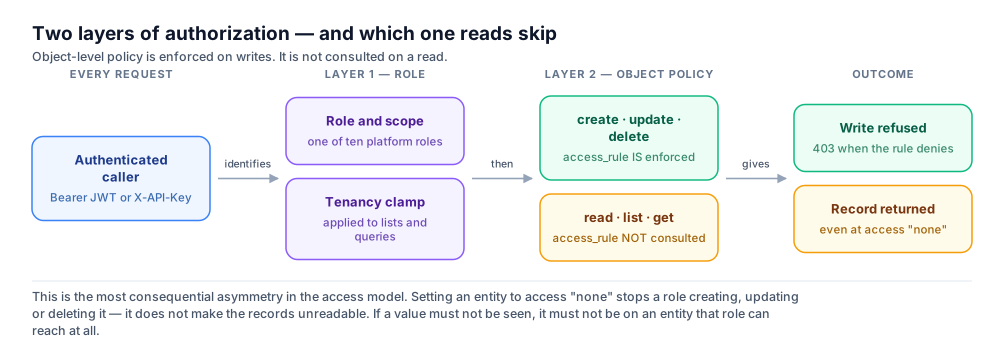
Layer one checks role and tenancy; layer two checks the object access policy on writes
Two layers — and reads do not traverse the second one.
  1. 1

    Layer 1 — identity, role and scope

    The caller resolves to a role and a position in the hierarchy. List and query results for a tenant-scoped caller are clamped to their own tenant before anything is returned.

  2. 2

    Layer 2 — the object access policy

    Per-entity rules, row filters tied to the caller’s own identity, and hidden or read-only fields. This layer is evaluated on create, update and delete.

🚨 Object policy is enforced on writes, not on reads

This is the most consequential asymmetry in the model, so plan around it rather than discovering it. Setting an entity to access "none" for a role stops that role creating, updating or deleting it — it does not make the records unreadable. If a value must not be seen by a role, it must not live on an entity that role can reach at all. See Access Policies.
The role set is fixed: platform_admin, platform_user, domain_admin, domain_user, project_admin, project_user, developer, tenant_admin, tenant_user, and viewer. Application builders normally work with the domain, project and tenant tiers plus viewer; the two platform_* roles are for platform operations and are not assignable to your own end users. There is no super_admin. See Roles & Permissions Reference.

The Schema Engine

A schema definition describes one type: its attributes, its references to other types, an optional parent_type, and an optional extends that builds on a platform base type.
json
{
  "name": "Product",
  "schema_type": "object",
  "schema_content": {
    "name": "Product",
    "namespace": "mystore",
    "parent_type": "tenant",
    "extends": "product:base_product",
    "attributes": [
      { "name": "sku",   "type": "string",  "mandatory": true },
      { "name": "price", "type": "float",   "mandatory": true },
      { "name": "status", "type": "string", "values": ["draft", "live"] }
    ],
    "references": []
  },
  "version": "1.0.0"
}

⚠️ extends must be inside schema_content

Placed at the wrapper level it is silently stripped before the schema is stored, and the type will simply not inherit anything — with no error to tell you. The same is true of the other schema_content keys.

ℹ️ attributes is canonical; fields is accepted

The platform accepts fields as a synonym for attributes, and required as a synonym for mandatory, so older samples still work. The two spellings are not equivalent once you read back. A body sent with fields is stored under attributes, so a read never returns the key you wrote and a diff of request against response will always disagree there. required is accepted but not rewritten, so a schema authored with required reads back with required alongside the mandatory fields it inherits from a base — two spellings in one response. Prefer the canonical spelling in anything you maintain.
Every record carries the system fields uuid, created_at, updated_at, fq_name, parent_type and parent_uuid, and is keyed on uuid — never on a numeric id. Path identifiers are UUIDs only: passing a name where a uuid is expected returns a 400 for the format before any access check runs. See the Schema Reference.

Tenant Isolation

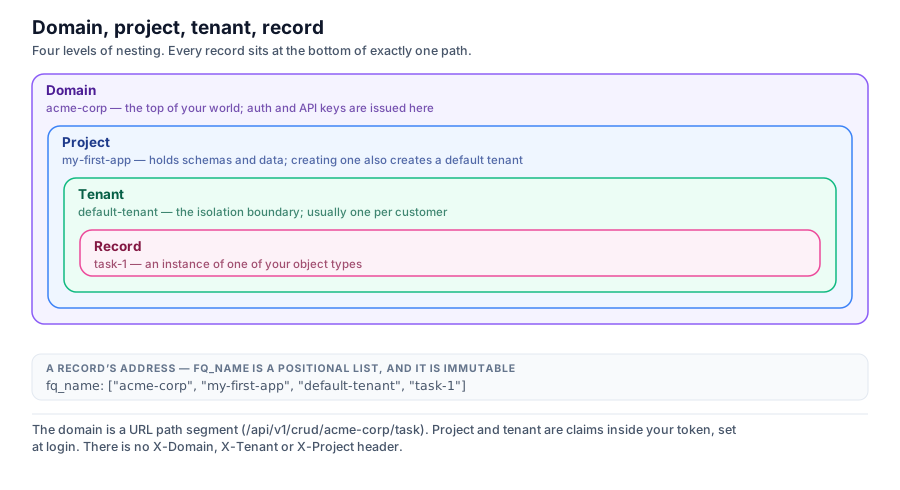
The hierarchy is Domain → Project → Tenant → UserAccount or ApiKey. A domain is your top-level account; projects group apps or environments within it; tenants are the isolated customers inside a project; and users and API keys authenticate at one of those levels.
Domain contains project contains tenant contains record, with fq_name as the record address
Every record sits at the bottom of exactly one path, and fq_name is that path.
Isolation is structural rather than a filter you have to remember: every record carries an fq_name whose segments encode its position in the hierarchy. Reads and writes are scoped to the caller’s own position, derived from their token, so a tenant-scoped caller does not see another tenant’s records.

🚨 The one exception, and it matters

Cross-tenant access is granted on two independent conditions, and only one of them is a role. Any user whose tenant is literally named default-tenant gets project-wide access to every tenant in that project, regardless of their role. Creating a project makes a default-tenant automatically, so this is easy to walk into. Use it for your own staff and test data; never provision a customer there. See Building Multi-Tenant Apps.
LevelRepresentsTypical roles
DomainYour top-level accountdomain_admin, domain_user
ProjectAn app or environment within a domainproject_admin, project_user, developer
TenantAn isolated customer within a projecttenant_admin, tenant_user
Cross-cuttingRead-only at whichever level it is issuedviewer

ℹ️ Namespace is not a tenancy level

A namespace is a grouping label on your schemas — it keeps type names from colliding between apps in the same domain. It is orthogonal to the hierarchy above and does not create a data boundary.

Where Your Data Lives

You address records by type and uuid; how they are laid out underneath is managed for you and is not part of the API contract. What is worth knowing is which of three arrangements your data is in, because the operational consequences differ.
ArrangementWhat it meansWhen to choose it
Managed storageSupero stores your records. The default.You are creating the data, and you want the platform to own durability and scaling.
Your own database, syncedA connector copies rows from a database you run, on a schedule.Another system is the writer of record and some staleness is acceptable.
Your own database, liveReads — and on supported sources, writes — go to your database on every request.Another system is the writer of record and staleness is not acceptable.
A domain can alternatively be configured to use PostgreSQL as its backend for record data. That is an opt-in choice made at the domain level rather than the default path, and the two are not mixed within one domain. For the connector-backed arrangements, see Connectors Overview and Connect Your Database.

Deployment and Security

An application you build on Supero can run in three places, and all three run the same generated application: Supero Cloud (published to a subdomain of supero.live, with no cloud account of your own), your own AWS or GCP account, or on-premise. See Choosing a Deployment Option.
  • •Transport: all external traffic to api.supero.dev and app.supero.dev is TLS-encrypted.
  • •Sessions: short-lived JWT access tokens with a longer-lived refresh token. API keys are opaque secrets for integrations and are never interchangeable with a Bearer token.
  • •Authorization: every request is evaluated against the caller’s role and scope, and every write additionally against the object access policy.
  • •Tenant isolation: enforced through the fq_name hierarchy, not by a client-supplied filter that could be omitted or tampered with.
  • •Input validation: writes are checked against the active schema — mandatory attributes must be present, and values are checked against declared types and enum values.

⚠️ Self-hosted deployments harden themselves

On an on-premise install, securing the database (authentication, network exposure) and enabling the key store that seals integration credentials at rest are your responsibility and are not done for you by default. See On-Premise Deployment and Security.

Next Steps

Platform Concepts

A closer look at domains, projects, tenants, schemas and roles. Read it

Authentication

The full login, refresh and API-key flow, with exact response shapes. Read it

Schema Reference

Attributes, references, enums, and extends. Read it

Deployment

Supero Cloud, your own AWS or GCP, and on-premise. Read it