Connectors Overview
Connect an external database, warehouse, file store, REST API, or webhook to a Supero project. Choose whether Supero copies the data in or reads it live at query time — your app talks to it through the exact same CRUD and query API either way.
What Is a Connector?
| source.plugin | Connects to | How data arrives |
|---|---|---|
| database | PostgreSQL (including Supabase), MySQL, SQL Server, Oracle, MongoDB, and all six analytical warehouses | Synced into Supero on a trigger, or read live from the source at query time |
| http_api | Any REST endpoint, with pagination, retry, and six auth modes | Polled into Supero on a trigger, or read live per request |
| csv_file | CSV, TSV, JSON, JSONL, Parquet, or Excel files on S3, SFTP, or a plain URL | Fetched and parsed into records on a trigger |
| webhook | Inbound pushed events, signature- or secret-verified | Written the moment a verified delivery arrives |
ℹ️ Warehouses are not a fifth plugin
ℹ️ Managed catalog first
Supported Sources
| Source | db_type | In console | sync | live_read | live_readwrite | Verified end to end |
|---|---|---|---|---|---|---|
| PostgreSQL | postgresql | Yes | Yes | Yes | Yes | Yes — the most exercised path, and the only source with a proven live_readwrite write-through |
| Supabase | supabase | Yes | Yes | Yes | Yes | Yes — sync, live, and mixed-mode |
| MySQL | mysql | Yes | Yes | Yes | Yes | Partly — discovery and live_read verified against a real MySQL; sync runs have not yet landed rows in a verification build, and live write-through has not been verified end to end |
| SQL Server | mssql | Yes | Yes | Yes | No — writes return 501 | Partly — discovery verified against a real SQL Server; sync runs have not yet landed rows in a verification build |
| Oracle | oracle | No — API and MCP only | Yes | No | No | No — never exercised against a live Oracle instance |
| MongoDB | mongodb | No — API and MCP only | Yes | No | No | No |
| Snowflake | snowflake | Yes (warehouse tile) | Not available | Yes | No | Yes — live warehouse reads verified against a real Snowflake account |
| Databricks | databricks | Yes (warehouse tile) | Not available | Yes | No | Yes — live warehouse reads verified against a real workspace |
| ClickHouse | clickhouse | No — API and MCP only | Not available | Yes | No | No — the driver is exercised in isolation, not against a live warehouse |
| BigQuery | bigquery | No — API and MCP only | Not available | Yes | No | No — the driver is exercised in isolation, not against a live warehouse |
| Redshift | redshift | No — API and MCP only | Not available | Yes | No | No — the driver is exercised in isolation, not against a live warehouse |
| Microsoft Fabric | fabric | No — API and MCP only | Not available | Yes | No | No — the least exercised of the six warehouses |
| REST API | (plugin http_api) | Yes | Yes | Yes | No | Yes — sync and live reads both verified at volume |
| File — plain URL | (plugin csv_file) | Yes | Yes | No | No | Yes — discovery and full sync verified against a real public file |
| File — Amazon S3 | (plugin csv_file) | Yes | Yes | No | No | No — exercised in isolation only |
| File — SFTP | (plugin csv_file) | Yes | Yes | No | No | No — exercised in isolation only |
| Webhook | (plugin webhook) | Yes | Yes | No | No | Partly — configuration and signature verification are verified; see the caveat on inbound delivery below |
⚠️ Google Cloud Storage is not a supported file source
⚠️ Inbound webhook delivery is not published on api.supero.dev today
Data Modes: Sync vs. Live Read
| Mode | Storage | Reads | Writes |
|---|---|---|---|
| sync (default) | Copied into Supero on a schedule, webhook, or manual trigger | Served from the local copy | Full CRUD against the local copy |
| live_read | None — no copy is kept in Supero | Real time, straight from the source, on every request | Blocked (writes return 403) |
| live_readwrite | None — no copy is kept in Supero | Real time, straight from the source | Passed through to the source in real time |
Access modes
| access_mode | What it means | Set when |
|---|---|---|
| sync | Full CRUD against Supero’s own copy of the data | Any table is in sync mode (the default) |
| live-ro | Read-only, live from the source; writes are rejected | A non-warehouse table is set to live_read |
| live-rw | Read and write, live, straight through to the source | A table is set to live_readwrite |
| warehouse | Read-only analytical queries against a warehouse | A warehouse-type source is set to live_read |
⚠️ Warehouses are read-only
Creating a Connector in the Admin Console
- 1
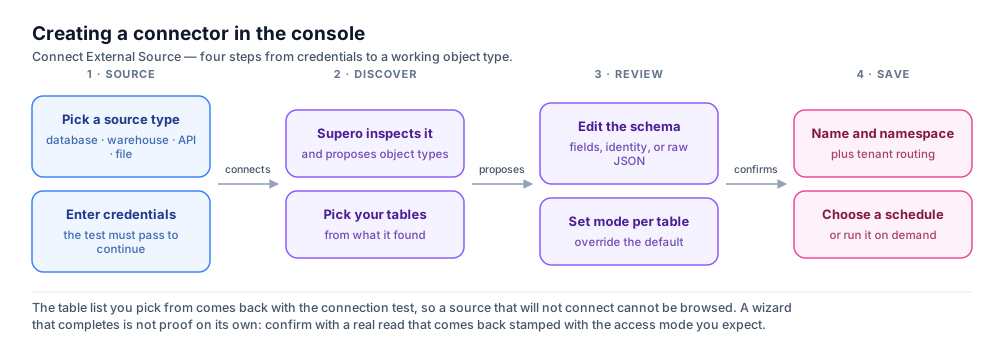
Step 1 — Source
Pick one of four source tiles: REST API, Database, CSV / File, or Webhook. Give the connector a display name, then fill in the per-source config. For a database that means database type, host, port, database, username, password, an optional schema, and a data source choice of Table or Custom SQL Query. This step also carries the Connector Mode choice — Sync (full), Sync (incremental), Live In (Read), or Live In (Read/Write) — which becomes the default mode for every table. For a warehouse there is no choice to make: the panel states that analytics warehouses are read-only and locks the connector to live read.
- 2
Step 2 — Discover
Supero inspects the source and proposes object types for the tables or streams it finds, sampling rows to infer field names and types. It runs as a job with a progress bar, and finishes by handing back a list of proposed schemas plus a suggested namespace. Nothing is created yet. If you named tables on Step 1, only those come back pre-ticked; if you left the table list empty, everything found is ticked.
- 3
Step 3 — Review
The left rail lists the discovered schemas with checkboxes; the right pane has three tabs. Fields lets you rename each column’s target field inline. Identity lets you pick which attributes derive a record’s name, and with which separator — this is what gives a live table a stable primary key. JSON is a read-only preview of exactly what will be saved. Each table also carries its own Data mode control here, so you can override the connector-level choice per table. You must select at least one schema to continue.
- 4
Step 4 — Save
Confirm the auto-generated connector ID (it warns you if it collides with an existing one), the display name, an optional description, and the schema namespace — lower-case, 2 to 24 characters, starting with a letter. Expand Tenant Routing if the source serves more than one of your tenants, and Sync Schedule to pick a cron preset or write your own five-field cron. A summary of endpoint, connector ID, target schema, namespace, schema count, and trigger sits at the bottom. Save creates the connector and its schemas together.
The connection test, and how the table list is populated
⚠️ Skipping the test also skips the table expansion
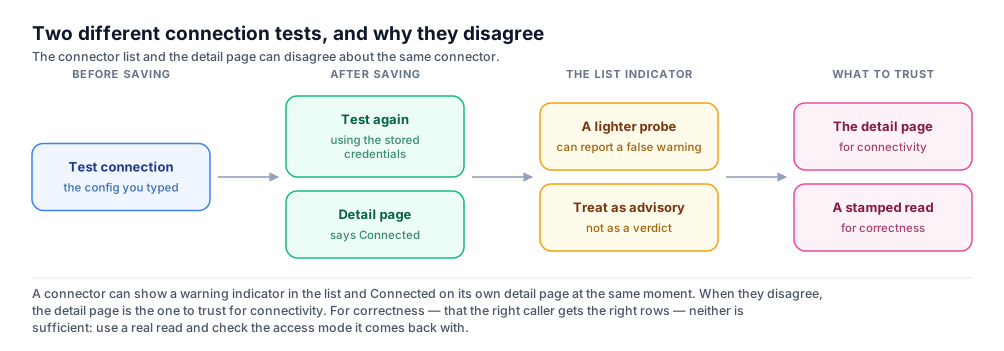
⚠️ A successful wizard is provisional
Limits worth knowing before you click
- •Selecting more than 100 tables for discovery is rejected with too_many_tables_for_sampled_discovery. Select fewer, or run discovery over the API with infer_from set to "schema", which skips row sampling and scales further.
- •Warehouse discovery samples at most 50 tables in one pass and reports that it capped in the run stats. The console does not surface that number, so on a wide warehouse, name the tables you want.
- •A live table needs an identity. If you set a table to live_read or live_readwrite and no identity fields are chosen, Save refuses and takes you back to the Review step with that table’s Identity tab open. The five HTTP-based warehouses are exempt, because the read planner supplies its own deterministic ordering; Fabric is not exempt.
- •A tenant-routing refusal from the backend is shown as a red list of the exact table and column pairs that caused it, with the single-tenant attestation checkbox directly underneath as the remedy.
- •The schedule panel is hidden when a connector copies nothing — a database connector whose every table is live has nothing to schedule. Flip one table back to sync and it returns.
Source Configuration Reference
| Source | Connects to | Delivery modes |
|---|---|---|
| Database | PostgreSQL (including Supabase), MySQL, SQL Server, Oracle, MongoDB | sync everywhere; live_read for PostgreSQL, Supabase, MySQL, and SQL Server; live_readwrite for PostgreSQL, Supabase, and MySQL |
| Warehouse | Snowflake, Databricks, ClickHouse, BigQuery, Redshift, Microsoft Fabric | live_read only |
| Files | CSV, TSV, JSON, JSONL, Parquet, or Excel from S3, SFTP, or a plain URL | sync |
| HTTP API | Any REST API, with pagination and auth handling | sync; live_read (no live_readwrite) |
| Webhook | Inbound pushed events, signature- or secret-verified | sync (event-driven) |
Database source config
{
  "plugin": "database",
  "config": {
    "db_type": "postgresql",
    "host": "db.example.com",
    "port": 5432,
    "database": "analytics",
    "schema": "public",
    "username": "reader",
    "password": "REDACTED",
    "query_type": "table",
    "table_names": ["orders"],
    "ssl_mode": "require",
    "batch_size": 1000
  }
}Warehouse source config
{
  "plugin": "database",
  "config": {
    "db_type": "bigquery",
    "project_id": "my-gcp-project",
    "dataset": "analytics",
    "location": "US",
    "service_account_json": "REDACTED",
    "query_type": "table",
    "table_names": ["orders"]
  }
}HTTP API source config
{
  "plugin": "http_api",
  "config": {
    "url": "https://api.example.com/data",
    "method": "GET",
    "auth": {
      "type": "api_key",
      "api_key": "YOUR_API_KEY",
      "header_name": "X-API-Key",
      "api_key_location": "header"
    },
    "pagination": { "pagination_type": "offset", "limit": 100 },
    "response": { "data_path": "results", "total_path": "count" }
  }
}File source config
{
  "plugin": "csv_file",
  "config": {
    "source_type": "s3",
    "s3_bucket": "my-data-bucket",
    "s3_region": "us-east-1",
    "file_path": "exports/users/*.csv",
    "file_format": "csv",
    "csv_delimiter": ",",
    "csv_has_header": true
  }
}Webhook source config
{
  "plugin": "webhook",
  "config": {
    "auth_type": "signature_hmac",
    "hmac_secret": "REDACTED",
    "hmac_header": "X-Hub-Signature-256",
    "hmac_algorithm": "sha256",
    "hmac_prefix": "sha256=",
    "payload_type": "json",
    "response_mode": "async"
  }
}
Add a Connector Over the API
1. Test the source config
curl -X POST https://api.supero.dev/api/v1/connectors/test-config \
  -H "Authorization: Bearer $ACCESS_TOKEN" \
  -H "Content-Type: application/json" \
  -d '{
    "source": {
      "plugin": "database",
      "config": {
        "db_type": "postgresql",
        "host": "db.example.com",
        "port": 5432,
        "database": "analytics",
        "username": "reader",
        "password": "REDACTED"
      }
    }
}'2. Create the connector
curl -X POST https://api.supero.dev/api/v1/connectors \
  -H "Authorization: Bearer $ACCESS_TOKEN" \
  -H "Content-Type: application/json" \
  -d '{
    "name": "orders-db",
    "source": {
      "plugin": "database",
      "config": { "db_type": "postgresql", "host": "db.example.com", "port": 5432, "database": "analytics", "username": "reader", "password": "REDACTED", "query_type": "table", "table_names": ["orders", "customers"] }
    },
    "target": { "tables": [] },
    "trigger": { "type": "manual" },
    "project_uuid": "8f14e45f-2d3a-4b1c-9e6a-1234567890ab"
  }'
ℹ️ The create response does not echo what you sent
3. Run discovery
curl -X POST https://api.supero.dev/api/v1/connectors/{connector_id}/discover \
  -H "Authorization: Bearer $ACCESS_TOKEN" \
  -H "Content-Type: application/json" \
  -d '{ "streams": ["orders", "customers"], "sample_limit": 100, "timeout_seconds": 300, "infer_from": "samples" }'

# poll:
curl https://api.supero.dev/api/v1/connectors/{connector_id}/discover/{execution_id} \
  -H "Authorization: Bearer $ACCESS_TOKEN"

# then read the proposal:
curl "https://api.supero.dev/api/v1/connectors/{connector_id}/discover/{execution_id}/results?include_samples=true" \
-H "Authorization: Bearer $ACCESS_TOKEN"| Discovery field | Purpose |
|---|---|
| streams | Which tables to inspect. Omit or send null to inspect everything the source exposes. |
| sample_limit | Rows sampled per stream, 1 to 1000. Default 100. |
| timeout_seconds | 30 to 1800. Default 300. |
| infer_from | "samples" (default) reads real rows and infers types from them. "schema" skips sampling — use it when you have more than 100 tables. |
4. Confirm which tables go live
{
  "target": {
    "namespace": "sales",
    "tables": [
      { "schema": "order", "source": "orders", "operation": "upsert", "batch_size": 1000 },
      { "schema": "customer", "source": "public.customers", "mode": "live_read" }
    ]
  }
}The Control-Plane API
| Action | Method and path |
|---|---|
| Create a connector | POST /api/v1/connectors |
| List connectors | GET /api/v1/connectors (add ?include_stats=true for run counts, ?project_uuid=, ?scope=domain for cross-project) |
| Get one connector | GET /api/v1/connectors/{connector_id} |
| Update a connector | PUT /api/v1/connectors/{connector_id} — the only update verb; PATCH returns 405 |
| Delete a connector | DELETE /api/v1/connectors/{connector_id} |
| Enable / disable | POST /api/v1/connectors/{connector_id}/enable or /disable |
| Test a config before creating | POST /api/v1/connectors/test-config |
| Test a saved connector | POST /api/v1/connectors/{connector_id}/test |
| Start schema discovery | POST /api/v1/connectors/{connector_id}/discover |
| Poll discovery progress | GET /api/v1/connectors/{connector_id}/discover/{execution_id} |
| Read discovery results | GET /api/v1/connectors/{connector_id}/discover/{execution_id}/results |
| Trigger a run | POST /api/v1/connectors/{connector_id}/run |
| Cancel a running execution | POST /api/v1/connectors/{connector_id}/runs/{execution_id}/cancel |
| Status, stats, and recent executions | GET /api/v1/connectors/{connector_id}/status?limit=10 |
| Analytical SQL against a warehouse | POST /api/v1/connectors/{connector_id}/run_query |
| Import a connector into another project | POST /api/v1/connectors/{connector_id}/import |
| Browse the public catalog | GET /api/v1/connectors/catalog |
| List source plugins | GET /api/v1/connector-plugins |
| Start an OAuth authorization-code flow | GET /api/v1/connectors/{connector_id}/oauth/authorize |
| OAuth redirect target | GET /api/v1/connectors/oauth/callback |
| Refresh an OAuth token | POST /api/v1/connectors/{connector_id}/oauth/refresh |
| Check OAuth authorization state | GET /api/v1/connectors/{connector_id}/oauth/status |
ℹ️ GET /api/v1/connector-plugins does not list every plugin
⚠️ Cancel is best-effort
Operating a Connector
| Action | Where | What it does |
|---|---|---|
| Enable / disable | Detail page header | A disabled connector runs nothing — no schedule, no manual run. Any execution in flight is cancelled. |
| Run Now | Detail page header, and each gallery card | Runs the connector once, honouring the incremental watermark. Replaced by a Read-only · live chip on a connector that copies nothing. |
| Full Re-sync | Detail page header | Runs once ignoring the incremental watermark and re-pulls everything. |
| Run History | Run History tab | The last 50 executions: status, trigger type, when, duration, and records written. A live-only connector says so instead of showing an empty table. |
| Per-table settings | Settings › Tables & Routing | Per table: data mode, target schema, identity fields, operation (upsert / insert / update), batch size, and on-error behaviour (skip / fail). |
| Re-discover | Settings › Source Tables | Saves first, then re-runs discovery for the selected tables. It starts the job and returns immediately — check Run History to see whether it finished. |
| Connect Account | Overview tab | Only for an http_api connector using the OAuth authorization-code flow. Redirects to the provider, then returns with the token stored. The banner also offers Refresh Token and Reconnect. |
| Query | Query tab | Ad-hoc read-only SQL against a warehouse connector. Appears only when the connector attests a read-only role. See Warehouse Connectors. |
| Delete | Settings › Danger Zone | Removes the connector. Read the warning below first. |
🚨 Deleting a connector also deletes its object types
Scheduling
| Where | What you can set |
|---|---|
| Wizard, Step 4 | A cron preset — every 10 minutes, every 30 minutes, hourly, every 6 hours, daily at 02:00, weekly Monday 02:00 — or a free-text five-field cron plus a timezone. |
| Settings › Schedule / Trigger | Trigger type, cron, timezone, timeout in minutes (1–1440), max records per execution, max errors before the run fails, and allow_manual. |
| Settings › Schedule / Trigger, incremental connectors only | reconcile_cron — a second, less frequent cron that ignores the incremental watermark and re-pulls everything to repair drift. It can only be set here, never in the wizard. |
⚠️ Confirm a scheduled run actually happened
Scoping a Live Source by Tenant
{
  "schema": "customer",
  "source": "public.customers",
  "mode": "live_read",
  "live": {
    "tenant_binding": {
      "mode": "column",
      "tenant_field": "org_id",
      "tenant_value_map": { "acme": "42", "globex": "77" },
      "on_unmapped_tenant": "deny"
    }
  }
}| tenant_binding.mode | Behavior |
|---|---|
| fixed | The whole connector belongs to one tenant — no per-row filtering needed. |
| column | Rows are filtered by tenant_field, mapped from your Supero tenant to the source’s value via tenant_value_map. |
⚠️ Fails closed
ℹ️ The wizard writes a fixed binding
Using Connector-Backed Data in Your App
curl https://api.supero.dev/api/v1/crud/acme-corp/customer?limit=20 \
  -H "Authorization: Bearer $ACCESS_TOKEN"

curl -X POST https://api.supero.dev/api/v1/crud/acme-corp/query \
  -H "Authorization: Bearer $ACCESS_TOKEN" \
  -H "Content-Type: application/json" \
-d '{ "type": "customer", "filters": {"org_id": "acme"} }'import supero
org = supero.connect(domain_name="acme-corp", api_key="ak_...")
# Works the same whether "customer" is a native schema or a live-read connector table
customers = org.crud.list("customer", limit=20)
recent = org.crud.query("customer").filter(org_id="acme").order_by("-created_at").all()⚠️ Writes on read-only sources
Public Catalog: Zero-Setup Connectors
curl "https://api.supero.dev/api/v1/connectors/catalog?category=Crypto" \
-H "Authorization: Bearer $ACCESS_TOKEN"| Auth mode | What it means |
|---|---|
| none | No key required — the connector works immediately. |
| byo | You supply your own key; the catalog form tells you which field it fills. |
Ownership, Status, and Security Posture
| status | Meaning |
|---|---|
| active | Running normally / available for use. |
| paused | Disabled — scheduled and manual runs do not execute. |
| error | The last run or connectivity check failed. |
Security posture
- •Secrets — database passwords, API keys, warehouse tokens — are stored server-side and are never echoed back in a GET or list response; fields that look like a credential (password, api_key, token, service_account, and similar) are masked before the response reaches your browser. That is also why a config you read back cannot be replayed into test-config.
- •Connection tests and live REST reads only reach publicly routable hosts. Targets that resolve to a private, loopback, link-local, or cloud-metadata address are rejected before any connection is attempted.
- •A source outage on a resolved live binding returns an error (502/503) rather than an empty result set. There is one narrow exception where a live-backed type can return 200 with zero rows without reaching your source — check the access_mode stamp rather than the row count. See Live Data, Read-Only & Security.
- •An unmapped field on a live-read query fails closed with a 4xx error rather than silently dropping a filter or scoping predicate.
Next Steps
- •Database Connectors — the full configuration reference for OLTP sources, incremental sync, and TLS
- •Warehouse Connectors — Snowflake, Databricks, ClickHouse, BigQuery, Redshift, and Fabric, plus the Query console and its cost controls
- •File, HTTP API, Webhook & Public Catalog — the three plugins that need no database driver, including live reads over REST
- •Live Data, Read-Only & Security — the security reference for the live path
- •Connect Your Database — a worked end-to-end example
- •Schema Design — how fields, references, and extends work for the schemas your connectors populate
On this page