Documentation/Connectors/Live Data, Read-Only & Security
Live Data, Read-Only & Security
The security model behind live (BYODB) connectors: how read-only and write-through are enforced, how multi-tenant sources stay isolated, how source credentials are protected, and how every query is validated before it reaches your database or warehouse.
Overview
For the complete set, see Connectors Overview.
When a schema is backed by a live connector — a live_read or live_readwrite table on a database connector, or any table on a warehouse connector — Supero never stores a copy of that data. Every read, and every write on a writable table, goes straight through to your own source in real time, on every request. This page is the security reference for that path: what's guaranteed read-only, how multi-tenant sources stay isolated, how source credentials are protected, and how every query is validated before it ever reaches your database or warehouse.
These guarantees apply uniformly across every live source: PostgreSQL (including Supabase), MySQL, or SQL Server tables set to live_read or live_readwrite, an http_api table set to live_read, and every warehouse connector (Snowflake, Databricks, ClickHouse, BigQuery, Redshift, Microsoft Fabric). For how to configure a specific source, see Database Connectors, Warehouse Connectors, and File, HTTP API, Webhook & Public Catalog; for the full object-level RBAC field reference, see Access Policies. This page is the map that ties the security-relevant pieces together.
ℹ️ Who this is for
You, or whoever on your team is deciding whether to grant Supero read (or read/write) access to a production database or warehouse. Every claim on this page is about what's enforced by the platform, not something your app has to implement itself. For a worked, end-to-end walkthrough of wiring a source up, see Connect Your Database.
The No-Copy Guarantee
A live connector is deliberately transparent to your app: you read and write it through the exact same CRUD and query endpoints you'd use for any Supero-native schema. There's no separate API to learn and nothing in the call shape gives away whether a record came from local storage or a live source.
bash
curl https://api.supero.dev/api/v1/crud/acme-corp/customer?limit=5 \
  -H "Authorization: Bearer $ACCESS_TOKEN"
python
import supero

org = supero.connect(domain_name="acme-corp", api_key="ak_...")

# Identical call whether "customer" is a native schema or a live-read connector table
customers = org.crud.list("customer", limit=5)
What's different is what happens behind that call: when the requested type is bound to a live table, the platform resolves the binding, builds a query, executes it against your source at that exact moment, and maps the rows back into your schema's fields on the way out. There is no background copy job for live_read or live_readwrite tables, and nothing from a live table is persisted to Supero's own record storage.
⚠️ Warehouse results are held in a short-lived in-memory cache
One qualification, because "nothing is stored" is the sentence a security reviewer will hold you to. Warehouse-mode reads pass through a short-lived in-memory result cache, so that a dashboard refreshing on a timer — and several people watching it at once — collapse into a single warehouse query. Rows are held for up to a minute, in memory only: never written to disk, never written to the record store, and discarded on restart. Large results are served without being cached at all. Two consequences worth planning around: a warehouse figure can be up to a minute stale, and row values do transit a shared in-memory cache, so a table whose values may never be co-resident in Supero memory should be bound live from an OLTP source rather than in warehouse mode.
That cache does not apply to live_read or live_readwrite tables served from an OLTP source, or to a live_read table on an http_api source — those reach your source on every request.
A single live query returns up to 10,000 rows by default; if a query would return more, results are capped and the response is marked as a partial scan rather than silently truncated without warning. A source outage — a timeout, a refused connection, an error from your database or warehouse — normally surfaces as an explicit error naming the connector rather than as an empty result.
🚨 One case where an empty result does not mean an empty source
There is a narrow window where a live read can return 200 with zero rows without reaching your source. If the connector binding cannot be resolved at that moment, the read proceeds against the empty local store rather than failing. The same shape occurs for a caller who lacks permission to list the domain's connectors, because the binding is resolved with the caller's own token. Do not treat "200 and no rows" as proof that the source is empty. Check the access_mode stamp on the response — a genuine live read returns live-ro, live-rw or warehouse, and a fallback read returns none of them. Any monitoring or reconciliation you build on live data should assert on that stamp, not on the row count.
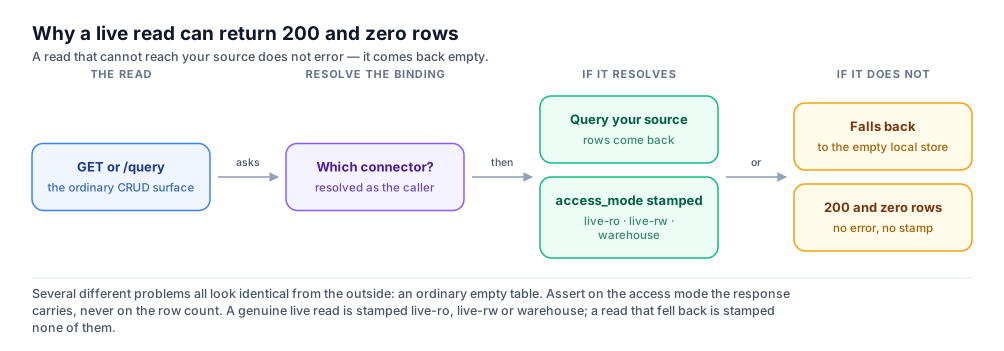
Once a binding has been resolved, this window closes: a failure from that point on is always an explicit error, never an empty page. A count-only read is covered by the same rule. The condition is also not cached, so it self-heals as soon as the connector layer is reachable again — which is exactly why it is worth asserting on the stamp rather than alerting on a row count that will look fine on the next poll.
Read-Only vs. Write-Through
Whether a live table accepts writes is controlled by its mode, set per table — never inferred from anything in the request. There are exactly two live modes, and the platform enforces the boundary between them the same way for every source type.
| Mode | Reads | Writes |
|---|---|---|
| live_read | Real time from the source, every request | Blocked — every create, update, and delete returns 403 |
| live_readwrite | Real time from the source, every request | Passed through to the source in real time — entity tables only, on a source that has a write path (see below) |
Write-through is implemented for PostgreSQL (including Supabase) and MySQL. A write to a live table on SQL Server, a warehouse, or a REST source is refused with 501 write_not_supported rather than attempted — no source is written to on a best-effort basis.
Write-through is further narrowed to tables the platform can safely address by a single, stable identity. Every live table is classified entity or event: entity tables have a real, non-temporal primary key — customers, devices, accounts — and support full get-by-uuid, list, query, and write access. Event tables are time-series or log-style data with no stable per-row key (or a key that includes a timestamp), addressed by dimension and time range rather than a single identity — they stay read-only, addressable only through filters and aggregation, even when the table is set to live_readwrite.
⚠️ Writes on a read-only table or stream
A create, update, or delete against a live_read table is rejected with 403 read_only_connector_schema. The same call against an event-classified stream is rejected with 501 not_writable regardless of mode, because writes address a row by identity and an event stream has none. Neither is partially applied or silently ignored. Warehouse connectors (Snowflake, Databricks, ClickHouse, BigQuery, Redshift, Fabric) are live_read only across the board, and an http_api table can only be live_read — there is no write-through path for either.
bash
curl -X PUT https://api.supero.dev/api/v1/crud/acme-corp/order_facts/8f14e45f-... \
  -H "Authorization: Bearer $ACCESS_TOKEN" \
  -H "Content-Type: application/json" \
  -d '{ "status": "shipped" }'

# 403 — order_facts is a live_read warehouse table
Tenant Isolation on Shared Sources
If a live table holds rows for more than one of your tenants — a single source table with a shared org_id or region column, for example — a tenant_binding on that table is what keeps one tenant's request from ever touching another tenant's rows.
| tenant_binding.mode | What it does |
|---|---|
| fixed | The whole connector belongs to one tenant. No per-row filtering happens, so this is only appropriate when the source genuinely holds a single tenant's data (or is an internal/ops-only source with no per-tenant split). |
| column | Every read and write is filtered by tenant_field, mapped from your Supero tenant to the source's own value via tenant_value_map. |
json
{
  "tenant_binding": {
    "mode": "column",
    "tenant_field": "org_id",
    "tenant_value_map": { "acme": "42", "globex": "77" },
    "on_unmapped_tenant": "deny"
  }
}
🚨 Unmapped tenants fail closed
on_unmapped_tenant defaults to "deny": a Supero tenant with no entry in tenant_value_map is denied outright, with a 403, rather than falling through to see every row unfiltered. This is the default behavior, not an opt-in setting — you would have to deliberately change it to get a different outcome, and there is no supported way to make an unmapped tenant see unfiltered data.
A live table is also unreadable — 403 on every request — until it has a confirmed binding (field mappings, primary key, and tenant_binding all set from discovery). An unconfirmed or partially-configured live table fails closed the same way an unmapped tenant does; it never falls back to exposing unscoped rows because part of its configuration is missing.
The same enforcement applies to a live read over REST. An http_api table bound live_read carries a tenant_binding and has the tenant predicate applied to the outbound request in the same way a SQL live table does — binding a REST endpoint live does not opt out of tenant isolation.
⚠️ Column-mode tenant routing is not available from the create wizard
A live table created through the admin console is always saved with a fixed tenant binding, whatever you enter in the wizard’s tenant-routing panel — the panel says so itself. To use column-based per-row tenant scoping on a live table, set the binding over the API with a PUT and confirm it with a GET.
How Source Credentials Are Protected
The database password, API key, warehouse token, or private key you give Supero to reach your source is stored as a secret reference on the connector (source.secret_refs) and resolved server-side only at the moment a query or sync actually runs. Your application code never sees it, and neither does anyone reading the connector back through the API.
- •A credential is never returned in a GET or list response for a connector — any field that looks like one (password, api_key, token, private_key, service_account_json, wallet, and similar patterns) is masked before the response leaves the server.
- •This redaction applies everywhere a connector can be read back, including a cross-project listing scoped to your whole domain — there is no view of a connector, anywhere in the API, that echoes back the credential you configured.
- •A credential is resolved fresh for each query or sync run rather than held decrypted in memory between requests, so rotating it on your source side and updating the connector is a clean swap.
- •Because credentials are masked on read, a source configuration you fetched from the API cannot be replayed into a connection test — a re-test has to be done against the saved connector so the stored secret is used server-side.
⚠️ One published bound on a revoked credential
PostgreSQL connection pooling can be enabled for a connector to cut per-request connection latency. It is off by default. When it is on, a pooled connection established with the old credential can stay in use for up to 15 minutes after you rotate that credential — that figure is the upper bound on how long a revoked credential can still be in use. If you are rotating in response to a suspected compromise rather than on a schedule, revoke at the source and treat 15 minutes as the window to plan around.
💡 Least-privilege source roles are still on you
Supero's guarantees are about what the platform does with the credential you provide — they don't substitute for scoping that credential correctly on your side. Use a read-only database role or warehouse role for a live_read connector, and a role limited to the specific tables you intend to expose for a live_readwrite one.
Where Supero Is Allowed to Connect
A connector is a URL or a host that you supply, which makes the connector layer an outbound request path that a caller can influence. It is guarded rather than trusted.
- •Every connection test, every sync run, and every live REST read is vetted against the target address before a connection is opened. A target that resolves to a private, loopback, link-local, or cloud-metadata address is refused — the cloud metadata endpoint in particular, which is the classic escalation target for a server-side request forgery.
- •The guard is re-applied per redirect hop rather than once at the start, so a public URL that redirects to an internal address does not slip through. Outbound REST requests do not follow redirects blindly.
- •The guard is on by default. If you genuinely need to reach a host inside a private range — an on-premise deployment reaching your own network — that is an allow-list your operator configures explicitly, not something a connector config can turn off.
- •BigQuery’s token endpoint is pinned to Google’s own address rather than taken from the service-account JSON, so a tampered credential file cannot redirect a token exchange somewhere else.
Safe Query Execution
Identifiers and parameters
Every field name your app references when it reads or writes a live table — in a filter, a sort key, or a field projection — is checked against that table's discovered column list before it's used to build a query. A field outside that list is rejected outright rather than silently dropped or passed through unchecked, so a request can never reference a source column Supero hasn't already confirmed exists. Every value your app supplies — the right-hand side of a filter comparison, for instance — is sent to the source as a bound query parameter, never concatenated into SQL text, the same discipline you'd expect from a parameterized query you wrote yourself.
Field-level RBAC guards inputs, not just responses
If you've configured hidden_fields on an access_rule (see Access Policies) for a role, the obvious protection is that the field is stripped from every read response for that role. On a connector-backed entity, that protection goes one step further: the same field names are also blocked as query inputs — you can't filter on them, sort by them, or use them in an aggregate or group-by, even though the request itself never asks to see the field's value.
That extra check closes a real gap: stripping a hidden field from the response alone would still let a caller infer its value by testing it in a filter — for example, confirming whether a hidden salary column exceeds some amount purely from whether a filtered request returns the row, without the field ever appearing in the output. Blocking the field as a query input as well as a response field closes that inference channel.
bash
curl -X POST https://api.supero.dev/api/v1/crud/acme-corp/query \
  -H "Authorization: Bearer $ACCESS_TOKEN" \
  -H "Content-Type: application/json" \
  -d '{ "type": "employee", "filters": {"salary": 200000} }'

# 400 — "salary" is a hidden_fields entry for this role, so it cannot be used as a query input
filters is a flat map of field to value, not a list of comparison objects. See Querying & Pagination for the full query surface.
The error is deliberately opaque about which field triggered it beyond naming the request as rejected — it never confirms or denies that a specific field exists or is hidden, which would itself leak information. An unrecognized field (one that isn't in the table's discovered columns at all, hidden or not) fails the same way, with a 400 that names the request as invalid rather than the specific reason.
What Your App Can — and Can't — Reach
Your app, and any JWT or API key it uses, never receives your source credentials and never gets a generic passthrough to your database or warehouse. Every live read or write happens because the platform's connector layer resolves the binding for that schema and executes a validated query on your behalf — there's no separate API surface that hands a caller raw access to the source using the connector's stored credentials.
The one deliberate exception is the warehouse Query console (run_query), which lets you run your own analytical SQL against a warehouse connector — and even that is gated tightly: it only works when you've explicitly attested the configured warehouse role is read-only and the connector's tenant binding is fixed (not per-tenant column scoping, since opaque caller SQL can't have a per-row tenant filter safely injected into it). Every statement submitted through it is still validated as a single read-only SELECT or WITH before it reaches your warehouse. See Warehouse Connectors for the full detail on that path, its requirements, and its cost controls.
Outside of that one attested, opt-in feature, there is no way for a caller — however privileged — to run arbitrary SQL against a connected source through the API. Structured reads and writes always go through the identifier-allowlisting and parameter-binding described above.
Next Steps
- •Connectors Overview — data modes, the supported-sources matrix, the console walkthrough, and the control-plane API
- •Database Connectors — full configuration reference for PostgreSQL, Supabase, MySQL, SQL Server, Oracle, and MongoDB sources
- •Warehouse Connectors — Snowflake, Databricks, ClickHouse, BigQuery, Redshift, and Fabric, including the Query console and its cost controls
- •File, HTTP API, Webhook & Public Catalog — including live reads over REST
- •Access Policies — the full access_policy and access_rule reference, including hidden_fields and owner-scope
On this page