Connect Your Database
Register the tables in a database you already run as object types in a Supero project, then read them where they are — synced into the platform store, or served live from the source on every request.
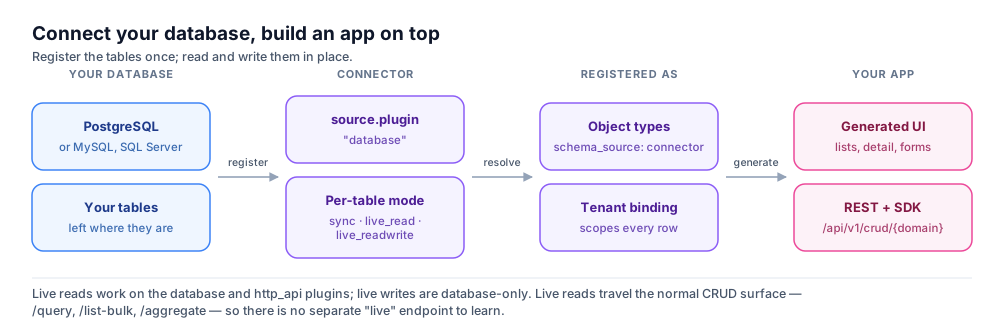
What It Is For
The Shape
POST /api/v1/connectors

{
  "name": "ops-postgres",
  "display_name": "Operations Postgres",
  "enabled": true,
  "fq_name": ["acme", "ops-postgres"],
  "parent_type": "domain",
  "schema_namespace": "ops",
  "project_uuid": "9f3c1b6a-2e5d-4f81-b0a7-3c5e9d1f2a44",

  "source": {
    "plugin": "database",
    "config": {
      "db_type": "postgresql",
      "host": "db.internal.example",
      "port": 5432,
      "database": "operations",
      "schema": "public",
      "username": "supero_reader",
      "password": "<supplied at create time>",
      "query_type": "table",
      "table_names": ["customers", "orders"],
      "ssl_mode": "require"
    }
  },

  "target": {
    "namespace": "ops",
    "tables": [
      {
        "source": "customers",
        "schema": "customer_mirror",
        "operation": "upsert",
        "mode": "sync",
        "stream_class": "entity",
        "batch_size": 50,
        "on_error": "skip",
        "enabled": true
      },
      {
        "source": "orders",
        "schema": "order_live",
        "operation": "upsert",
        "mode": "live_read",
        "stream_class": "entity",
        "enabled": true,
        "live": {
          "source": "orders",
          "primary_key": ["order_id"],
          "field_map": {
            "order_id": "order_id",
            "customer_id": "customer_id",
            "status": "status",
            "total": "total"
          },
          "columns": [
            { "name": "order_id", "sql_type": "int" },
            { "name": "customer_id", "sql_type": "int" },
            { "name": "status", "sql_type": "varchar" },
            { "name": "total", "sql_type": "int" }
          ],
          "tenant_binding": { "mode": "fixed", "tenant": "acme-ops" },
          "hidden_fields": ["internal_margin"]
        }
      }
    ]
  },

  "trigger": { "type": "manual", "allow_manual": true }
}
ℹ️ Mode is per table, not per connector
How It Works
| mode | A read is served from | A write | Available on |
|---|---|---|---|
| sync | The platform's own store, populated by connector runs | Lands in the platform store, not in the source | All four source plugins |
| live_read | The source, on every request | Rejected — the schema is read-only | The database and http_api plugins |
| live_readwrite | The source, on every request | Goes to the source | The database plugin only |
- 1
Upload the object type first
POST /api/v1/schemas/upload with the attributes you want exposed. A connector maps onto a type; it does not invent one from the source catalog.
- 2
Create the connector
POST /api/v1/connectors with the body above. Create validates the shape but does not dial the source: a 201 means the payload was accepted, nothing more.
- 3
Confirm the mode persisted
GET /api/v1/connectors/{id} and read target.tables[].mode and .live back. If they did not round-trip, the live surface is not wired.
- 4
Read through the normal CRUD surface
POST /api/v1/crud/{domain}/query, list-bulk and the aggregate endpoints all serve live rows. There is no live-specific endpoint and no second client to build.
- 5
Check the stamp
A live response carries access_mode: "live-ro" for an OLTP source or "warehouse" for a warehouse.
⚠️ 200 with zero rows is a wiring failure, not an empty table
What You Get
- •The full read surface over source tables — /query, list-bulk and the aggregate endpoints, on the same paths as native types.
- •Filter pushdown: a filter on a mapped column becomes typed SQL in the source dialect, not a client-side scan.
- •Cursor pagination as elsewhere — limit plus cursor. page and page_size are silently ignored here too.
- •Read-only enforcement with teeth: a write to a warehouse type is rejected, not quietly landed in a local store the live read cannot see.
- •access_mode stamping on every live envelope, so a UI can tell live from local without asking the connector API.
- •hidden_fields, so a source column never reaches a response, and tenant_binding, so a live row resolves to a tenant.
- •Roles, access policies and field policy apply to connector-backed types exactly as to native ones — see Access Control.
- •Four source plugins, and three trigger types: manual, schedule with a five-part cron, and webhook.
💡 Proven sources
What You Decide
ℹ️ Test, discover and run do exist — but they are not the same as a healthy read
- •Reachability. The source must be reachable from wherever the platform runs. A VPN, a firewall rule or a private subnet is a networking task you own — and it presents as an unstamped empty read, not a connection error.
- •Freshness. sync mode gives you a copy exactly as current as its last run; the trigger cadence is the whole of your freshness guarantee.
- •Write ownership. In live_readwrite both your application and the original system can write the same rows. Conflict rules and reconciliation are yours; the connector does not arbitrate.
- •Tenant resolution. tenant_binding decides which tenant a live row belongs to. Getting it wrong is not an error, it is rows shown to the wrong audience — verify it under a non-admin role.
Where to Go Next
Start here
Connectors Overview
The four source plugins and how a connector becomes an object type. Open
Databases
Database Connectors
The database plugin in detail — engines, config fields, live modes. Open
Before production
Connector Security
What a connector may do to the source, and how reads are scoped. Open
On this page