Documentation/Building Your App/AI Data Agent
AI Data Agent
Every generated app ships with a chat your end users can ask about their own records — and act on them. It runs as the signed-in user, needs no API key, and is on by default.
Overview
The AI Data Agent is a chat built into every app Supero generates. Your end users open it, ask a question in plain English, and it reads — and, with confirmation, writes — your app's own records. It answers by calling tools that are generated automatically from your schema, so it works on day one for whatever entities your app happens to have. There is nothing to wire up: it ships on, requires no API key, and needs no entry in your services list.
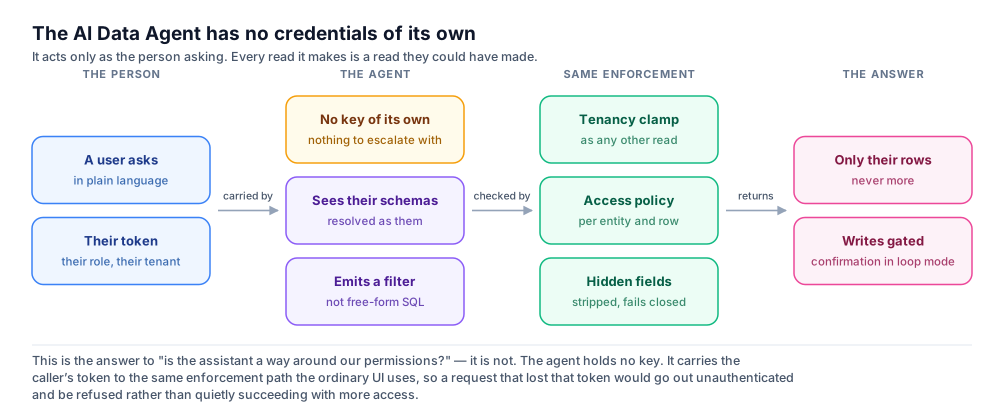
It has no credentials of its own. Every read and every write it performs is made as the person chatting with it, with their token, through the same access-control path the rest of your app uses. It can never see or change more than that person already could — see Scope and Data Isolation below for exactly how far that goes.
Four things called AI — which one is this?
Supero has several capabilities with AI in the name, and mixing them up is the most common source of confusion. This page covers the AI Data Agent, the runtime one. Here is the whole set, once:
| Name | What it is | Whose model |
|---|---|---|
| App Studio generation | Build time: you describe an app in prose and Supero generates the schemas, UI, and policies. See Build Your First App (App Studio). | Supero's |
| AI Data Agent (this page) | Runtime: your end users query and act on their own records in natural language, inside the deployed app. | Supero's on Supero Cloud, yours on-premise |
| The ai catalog integration | Runtime: your app's own code calling a language model for one feature — a summarize button, a draft-reply field. Imported like any managed catalog integration. | Yours — your provider key, your bill |
| Agentic loop | The multi-step engine behind the AI Data Agent. Not a separate product and not something you buy or enable separately. | — |
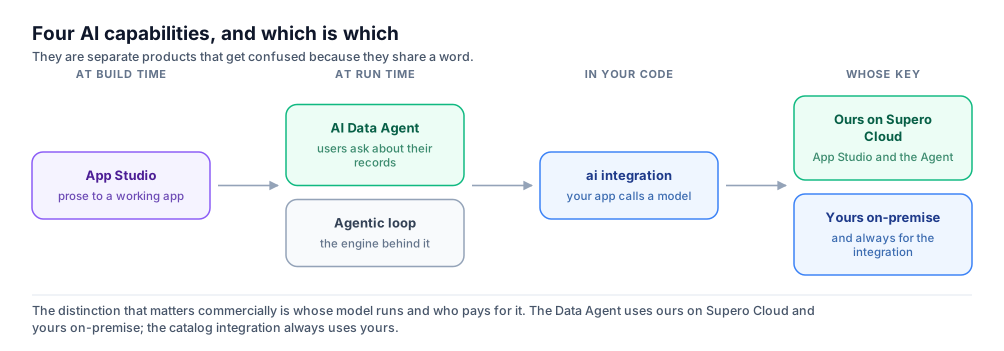
ℹ️ The Agent and the ai integration are not interchangeable
The AI Data Agent is a finished chat surface your end users talk to, and it works with zero setup. The ai catalog integration is a raw model call your own code makes, and it does nothing until it is imported and configured for that project. Never route the Agent through the ai integration — see Not to Be Confused With services.ai at the end of this page.
What the Agent Can Do
The Agent has no fixed skill set you configure. It reasons over your app's own schema and calls tools that are generated for it, one set per entity, plus a shared set of analytics, export, and charting tools. You never register any of these; they exist the moment your schema does, and they are regenerated as your schema changes.
Per-entity tools
Every entity in your schema gets five tools, named {operation}_{namespace}_{type} — or just {operation}_{type} for an app with a single default namespace. So a customer entity in a billing namespace produces search_billing_customer, get_billing_customer, and so on.
| Tool | Does | Confirmed first? |
|---|---|---|
| search_{type} | Filters and lists records — equality filters or richer comparison, range and set operators, plus sort and pagination. | No |
| get_{type} | Fetches one record by uuid. | No |
| create_{type} | Creates a new record. | No |
| update_{type} | Updates an existing record by uuid. | Yes, in loop mode |
| delete_{type} | Deletes a record by uuid. | Yes, in loop mode |
Two rules shape which tools exist at all. Platform-owned entities — projects, tenants, user accounts, API keys, audit logs, connectors, the schema registry — never get tools, so the Agent cannot reach the platform's own bookkeeping through chat. And an entity your schema declares read-only gets only search and get: no create, update, or delete tool is generated for it, so there is nothing for the model to call even if a user asks.
Analytics tools
Alongside the per-entity tools, the Agent has a shared, read-only set for questions that need a computed answer rather than a list of records:
| Tool | For questions like |
|---|---|
| db_stats | "What is the total and average order amount?" — sum, average, min and max over named numeric fields. |
| db_count_by | "How many orders per status?" — grouped counts. |
| db_distinct | "What categories exist?" — the unique values a field actually holds. |
| db_aggregate | Multi-stage grouping that the three above do not cover. |
| aggregate_data | "Roll that up by region" — a rollup over the result set it just fetched, without going back to the data. |
| calculate_metrics | "How much did that grow, and who are the top five?" — growth rates, percentages, and rankings. |
Exports and charts
Ask the Agent to hand you what it just found and it can package it as a file, delivered through the onFile callback (or rendered inline as a download by the ready-made panel):
- •export_to_excel — a multi-sheet spreadsheet (.xlsx) built from one or more previous results.
- •export_to_csv — a single CSV file.
- •generate_report — a formatted report with tables and summary text.
- •render_chart — a chart drawn from the result set, for "show me that as a bar chart" rather than a file.
💡 Only the per-entity tools are listed by the Tools API
GET /ai/v1/tools returns the schema-generated CRUD tools for your domain. The analytics, export, and chart tools above are always available to the Agent but do not appear in that listing — do not treat an absence there as an absence from the Agent. See the AI Agent API.
Context across a conversation
Pass the same session_id back on every call in a conversation and the Agent remembers earlier turns — "now show me only the ones from last month" resolves against whatever "them" referred to a moment ago. Start a new topic by leaving sessionId unset (or null) so a fresh session begins; the ready-made panel does this automatically per conversation.
How a Question Becomes a Query
The Agent does not write SQL, and there is no free-text query escape hatch. It emits a structured filter as the arguments to one of your entity tools, using a fixed operator grammar. That is worth understanding, because it is what makes the behaviour predictable: every question resolves to a filter you could have written yourself, and you can read exactly what it ran from the tool_calls it returns.
A worked example
A user of a clinic app types:
text
Show me February visits over $120, newest firstThe Agent picks search_visit from the tools generated for that app's schema and calls it with these arguments:
json
{
  "tool": "search_visit",
  "arguments": {
    "filters": {
      "op": "and",
      "conditions": [
        { "visit_date": { "between": ["2026-02-01", "2026-02-28"] } },
        { "amount": { "gt": 120 } }
      ]
    },
    "sort": [{ "field": "visit_date", "order": "desc" }],
    "limit": 50
  }
}
That call then runs exactly like any other read your app makes: same tenancy boundary, same access policy, same hidden-field rules. The rows that come back are the rows that user could have seen in a list view.
The operator grammar
A filter is either a flat map of field to value (plain equality), or a map of field to an operator object. The operators are:
text
eq   ne   gt   gte   lt   lte
in   not_in   between
contains   starts_with   ends_with   regex
exists
Combine conditions with {"op": "and", "conditions": [ ... ]}. Dates are ISO-8601. String comparisons are case-insensitive. search_{type} also takes sort (an array of {field, order} where order is asc or desc), limit (default 50, maximum 1000) and offset for paging.
| Someone asks | The Agent emits |
|---|---|
| "customers in India" | {"country": "IN"} — flat equality, no operator needed |
| "orders over 500" | {"total": {"gt": 500}} |
| "anything scheduled or pending" | {"status": {"in": ["SCHEDULED", "PENDING"]}} |
| "names starting with Ac" | {"name": {"starts_with": "Ac"}} |
| "tickets with nobody assigned" | {"assignee": {"exists": false}} |
It knows your enum values
Each tool is described to the model with the entity's filterable fields, their types, and — for enum fields — the exact set of allowed values. So an app whose status field allows SCHEDULED and COMPLETED gets an Agent that filters on those two and cannot invent a third. Ask for "cancelled visits" in that app and it will tell you no such status exists rather than silently returning nothing. Related entities are named in the same description, so it knows what a record links to and can follow it.
💡 The same grammar works without the AI
Because the model is only choosing tool arguments, you can call the tool yourself and skip the reasoning step entirely: POST /ai/v1/tools/{tool_name}/invoke takes the same arguments and returns the same result, deterministically, under the same access control. That makes this grammar usable as a straightforward query API. The full reference is in the AI Agent API.
Scope and Data Isolation
The single most important thing to know about the Agent is what it is not: it is not a second, privileged way into your data. It holds no key of its own and cannot obtain one. Every tool call it makes is authorized with the same session as the person chatting with it, and lands on the same access-controlled path as any other read or write in your app.
- •A role that can only read and write its own records — a filter rule scoped to the signed-in user — gets an agent that can only read and write that same user's own records, not everyone else's.
- •A role with no create, update, or delete rule on an entity gets an agent that cannot create, update, or delete that entity either, no matter how the request is phrased.
- •A multi-tenant app's tenant boundary applies the same way — the Agent cannot read or write across tenants any more than the rest of the app's UI can.
- •hidden_fields and readonly_fields policy rules still strip what the Agent can read back or write, exactly as they do for the generated UI.
- •Conversations are isolated per user as well as per domain, project, and tenant. One person's chat history is never readable by another.
⚠️ The Agent is not a privilege escalation path
Because it runs as the signed-in user, asking it nicely to "just this once" bypass a policy does nothing — the underlying read or write is rejected by the same policy engine that would reject a direct API call from that user. There is no agent-only credential to compromise, and no mode in which it acts as someone else.
The failure modes point the same way. A read whose field-policy lookup cannot be completed fails closed — you get an error, not an unfiltered record. And a code path that somehow lost the caller's token would send an unauthenticated request and be refused, rather than quietly falling back to broader access.
Confirmation Gates for Writes
On the default path, the Agent does not silently change your data. create_{type} runs immediately, but update_{type} and delete_{type} pause and wait for explicit approval before they execute.
⚠️ Gates are a property of the agentic-loop path
Confirmation gates apply when a turn runs through the agentic loop — mode auto (the default) or mode loop. In mode single, a single-pass mode, tools execute as soon as the model calls them and there is no approval step: an update or delete happens unattended. Note also that auto falls back to the single-pass path if the loop engine is unavailable in your deployment, and that fallback is silent. If gates are load-bearing for your integration, send mode: loop, which fails with a 503 instead of falling back.
When the Agent decides to call a gated tool, the turn stops instead of executing and hands you a pending gate to resolve. What that looks like depends on how you are reading the turn:
| Transport | How the pending gate arrives |
|---|---|
| Streaming (SSE) | A confirmation event carrying gate_id, tool_name, tool_arguments, and prompt_message — a human-readable description of the action. |
| Non-streaming chat | HTTP 200 with the response text describing the pending action and naming the gate_id to confirm with. |
| Session read (REST) | GET /ai/v1/loop/session/{session_id} reports status waiting_confirmation and a pending_confirmation object. The human-readable text is called prompt there, not prompt_message — same field, two names, split by transport. It also carries affected_records and expires_at. |
Resolve it with the two matching globals — approve to let the call proceed, reject to cancel it and let the conversation continue without it:
javascript
aiConfirmAction(gate.gate_id, sessionId);   // approve — the agent executes the call and resumes
aiRejectAction(gate.gate_id, sessionId);    // reject  — the agent resumes without executing it
There is a third option the ready-made panel does not surface: approve with edits. Calling the confirmation endpoint directly with modified_arguments runs the pending tool with your arguments instead of the ones the model proposed — useful when the intent was right but a value was not. See the AI Agent API for that request shape.
ℹ️ Gates expire
A pending confirmation is valid for five minutes. After that it expires and the turn cannot be resumed — the user simply asks again. Design your UI so a gate cannot sit unanswered indefinitely, and treat a stale gate_id as a normal, expected outcome rather than an error to retry.
💡 The ready-made panel already does this for you
AIChatPanel renders its own Approve and Reject buttons for every pending confirmation and calls these same globals under the hood. You only need to handle the confirmation event yourself if you are building a fully custom chat surface with aiChatStream.
Adding It to Your App
The Agent is already live for every app, so putting it in front of users is a question of rendering a surface, not of provisioning anything. There is no key to generate and nothing to add to config.py's services list. The SDK ships three surfaces:
| Surface | What it is | How you get it |
|---|---|---|
| Floating chat button | A circular button in the corner that opens a slide-over conversation. | Rendered by default in a generated app. Turn it off with AppShell.render({ enableAIChat: false }) in ui/app.js. |
| Full-page tab | The Agent as its own navigation tab, full width. | Declare a page with view: 'ai_assistant' in your UI schemas. An app that has one automatically suppresses the floating button. |
| Dashboard widget | The Agent embedded as a panel on a dashboard alongside other widgets. | Add the ai_assistant_panel widget to a dashboard's UI schema. |
The ready-made drawer: AIChatPanel
If you are laying out your own shell rather than using the generated one, mount AIChatPanel directly. It renders its own message list, composer, streaming text, and confirmation prompts — you only control when it is open.
javascript
// ui/app.js
function AppWithAgent() {
  var h = React.createElement;
  var _o = React.useState(false), open = _o[0], setOpen = _o[1];

  return h(React.Fragment, null,
    h('button', {
      onClick: function () { setOpen(true); },
      style: { position: 'fixed', bottom: 24, right: 24, borderRadius: '50%', width: 56, height: 56, zIndex: 1000 }
    }, '💬'),
    h(AIChatPanel, { isOpen: open, onClose: function () { setOpen(false); } })
  );
}| Prop | Type | Meaning |
|---|---|---|
| isOpen | boolean | Whether the panel is visible. AIChatPanel renders nothing when false. |
| onClose | function | Called when the user dismisses the panel — flip your open state back to false here. |
| inline | boolean (optional) | Renders full-width in place, without the slide-over drawer chrome — use this to give the Agent its own tab or page instead of a floating button. |
| inlineGreeting | string (optional) | Overrides the default opening message when inline is set. |
💡 Conversations survive a page reload
AIChatPanel keeps its message history in the browser, keyed to the current domain, tenant, and project — so reopening the panel, or refreshing the page, picks the conversation back up instead of starting over. That browser copy is what makes a reload seamless; the server-side history behind a session_id is retained separately, for 24 hours.
A custom chat surface: aiChatStream
If you want your own layout instead of the ready-made drawer, call the global aiChatStream(message, sessionId, callbacks) function directly. It streams the same conversation AIChatPanel uses, over Server-Sent Events, and hands you every event as a callback instead of pre-rendered UI. Pass null as sessionId to start a new conversation, then keep reusing the session_id you get back so later turns remember earlier ones.
javascript
function askAgent(question, sessionId, onAnswer) {
  var text = '';
  return aiChatStream(question, sessionId, {
    onChunk: function (delta) { text += delta; onAnswer(text); },
    onThinking: function (message, iteration) { /* optional: show a "thinking..." indicator */ },
    onToolCall: function (toolName, args) { console.log('agent is calling', toolName, args); },
    onToolResult: function (toolName, result) { console.log(toolName, 'returned', result); },
    onFile: function (fileEvent) {
      var file = createFileFromEvent(fileEvent);   // { url, filename, size, mimeType, blob }
      window.open(file.url, '_blank');
    },
    onConfirmation: function (gate) {
      // gate.gate_id, gate.tool_name, gate.tool_arguments, gate.prompt_message
      if (window.confirm(gate.prompt_message)) {
        aiConfirmAction(gate.gate_id, sessionId);
      } else {
        aiRejectAction(gate.gate_id, sessionId);
      }
    },
    onError: function (err) { showToast('AI error: ' + err.message, 'error'); },
    onDone: function (finalSessionId, stoppedByUser) { sessionRef.current = finalSessionId; }
  });
}| Callback | Fires with | Purpose |
|---|---|---|
| onChunk | text delta | A piece of the assistant's reply as it streams in — append to your running text. |
| onThinking | message, iteration | Progress commentary while the agent reasons between tool calls. |
| onTurnStart | sessionId, turnNumber | A new conversational turn has begun. |
| onToolCall | toolName, arguments, id | The agent is about to call a tool — good place to show a "checking your data..." indicator. |
| onToolResult | toolName, result | The tool's result came back. |
| onFile | file event | A generated file (an export) is ready — pass it to createFileFromEvent() for a downloadable blob URL. |
| onConfirmation | gate object | The agent wants to run something that needs approval before it executes — see Confirmation Gates above. |
| onError | Error | The stream failed. |
| onDone | sessionId, stoppedByUser | The turn is complete — save sessionId for the next call. |
aiChatStream also accepts an optional signal (an AbortSignal) in the callbacks object, so you can offer a Stop button that cancels an in-flight response.
Limits
| Limit | Value |
|---|---|
| Message length | 1 to 10,000 characters. |
| Tool-call rounds per turn | 1 to 10, default 5. This caps how many times the Agent can call a tool and reconsider before it must answer. |
| Search results per call | Default 50, maximum 1000. Page through the rest with offset. |
| Confirmation gate lifetime | Five minutes from the moment the turn pauses. |
| Server-side conversation history | Retained for 24 hours per session. |
A question whose answer needs more than a page of records is usually better asked as a computed one — "how many" or "totalled by" — so the Agent reaches for an analytics tool instead of trying to list everything.
Errors, Plan, and Cost
| Status | When | What to do |
|---|---|---|
| 401 | No session, an expired session, or a token that cannot be validated. | Send the user back through login — the same handling you already use for any other 401 in your app. |
| 402 | Your domain has used its AI-agent allowance for the current period, where usage enforcement is enabled for your account. | Show the returned message and prompt an upgrade rather than retrying the same request. |
🚨 A failed turn can still be an HTTP 200
For a non-streaming chat call, a failure partway through a turn is often returned as HTTP 200 with the error field populated and a human-readable explanation in response — the request succeeded even though the agent's turn did not. Check the error field, not just the status code.
On Supero Cloud: Supero provides the model
You do not supply an API key and you do not hold a provider account. Supero runs the model and meters the usage against your plan. Every plan includes a free monthly allowance of Agent queries; beyond that the Agent is a paid add-on, and it is bundled at no extra cost on the higher tiers. Current allowances and prices are on the Billing screen in your dashboard at app.supero.dev/billing and are subject to change — see Plans & Billing.
A 402 response body is structured so you can drive an upgrade prompt directly from it, rather than showing a generic failure:
| Field | Meaning |
|---|---|
| error | Always "quota_exceeded" on this response. |
| upgrade_required | Always true — a signal to show an upgrade prompt rather than a generic error. |
| meter | Which allowance was exceeded — "agent.prompt" for Agent messages. |
| limit / used / remaining | The allowance for the current period, how much has been used, and how much is left. |
| message | Human-readable text safe to show the user as-is. |
ℹ️ Supero does not disclose the model behind the Agent
Which provider and model answer a given question is not part of the contract and can change. Build against the request and response shapes, not against a particular model's behaviour.
On-Premise: Bring Your Own Model
On-premise, the AI Data Agent is a separately licensed add-on package, and it is bring-your-own-LLM. It never calls a Supero-hosted model. You point it at your own provider account, or at a model you run yourself for a fully air-gapped install with no outbound network calls at all — the data your users ask about never leaves your infrastructure, and neither does the question.
The add-on installs the runtime Agent only. Generating new apps, schemas, and UI stays in the hosted dashboard; the on-premise package is the runtime your users chat with. Install, licensing, and provider configuration are covered in On-Premise Add-Ons.
Everything else on this page — the tools, the filter grammar, the confirmation gates, and the access-control guarantees — behaves identically on-premise. Only the question of whose model answers, and who pays for it, changes.
Not to Be Confused With services.ai
services.ai is a completely separate thing from the AI Data Agent, and the two are not interchangeable.
The AI Data Agent is a finished, always-on chat surface for your end users. services.ai is a raw building block for when your app's OWN logic — not a chat window — needs an AI-generated response as one feature among many: a "summarize this" button, a draft-reply field, a classification step in a workflow. Like every integration in the managed services catalog, it has to be imported into your project and configured before your app can call it, and a project-scoped key can be refused on import — so it is not something you can assume is available.
Because of that gap, never wire the AI Data Agent to services.ai. The Agent already works with zero setup for every app; routing it through a catalog integration that may not be imported for a given project just adds a failure mode that does not need to exist. Reach for services.ai only inside your own app-feature code, and always handle the case where it is not imported.
ℹ️ Where to import and configure services.ai
Add it to config.py's services list (or import it after deploy), and call it from your own code with the services.ai.complete({prompt}) / services.ai.chat({messages}) wrappers — not by hand-building a request to the services execute endpoint. See the Managed Integrations & Provider Catalog page for the full import and configuration flow.
Next Steps
Where to go from here:
- •AI Agent API — the endpoints, the full filter grammar, and the confirmation request shape, for building your own surface.
- •Build Your First App (App Studio) — the build-time generation that produces the app the AI Data Agent then runs inside of.
- •Access Control — the policy model that scopes exactly what the Agent, and everyone else, can read and write.
- •Transactional Services — the stateful services (cart, order, booking, payment) the Agent's tools can read and act on.
- •On-Premise Add-Ons — installing and licensing the Agent on your own infrastructure with your own model.
On this page